Concept
The Hyperloop framework is a tool to run and manage analysis trains on AliEn. It is based on the concept of the LEGO train system used during Run 2. It builds on the O2 analysis framework, O2 DPL, MonALISA and LPM. If you are a Run 2 train expert, and you don't have much time, you can just jump to this section: Run 2 LEGO train expert.
In order to run trains on the Grid, the code has to be contained in an AliEn package. Therefore, the train uses the regularly deployed O2 tags. Hyperloop supports Run 3 data and converted Run 2 data.
Hyperloop provides a web interface for users and operators which allows to:
- register train wagons
- configure trains (wagons, input datasets)
- test the wagons and the train in a well-defined environment
- study the test results
- submit the train to the Grid
- study the resource consumption of the train for each wagon
The views available in the Hyperloop framework are:
- My Analyses
- All Analyses
- Dashboard
- Train Submission
- Train Runs
- For a user, the Datasets page displays a read view only of all the datasets available in the system. For a train operator, the Datasets page allows creation, configuration and deletion of datasets.
- For the DPG experts, the DPG Runlists page allows creation, configuration and deletion of runlists. For the users it offers a read only view of all DPG runlists available in the system.
Creating or joining an analysis
The Analyses to which a user belongs to, is defined through a JIRA ticket.
In the JIRA page, create an issue by clicking on the button Create, and fill the information with the following parameters:
- In Project select your PWG.
- In Issue Type select Analysis.
- In Summary write the name of your Analysis.
- In Components select your PAG.
- In Run 3 analysis choose
Yes. - In Analyzers select all the users that will be part of this analysis. All the analyzers will have writing permits to all components in the analysis.
- (Optional) In Description give a brief description of the analysis. The rest of the parameters are not relevant for the Hyperloop train system.
After all the parameters have been set, click on Create and your Analysis will be available in the My Analyses and All Analyses page.
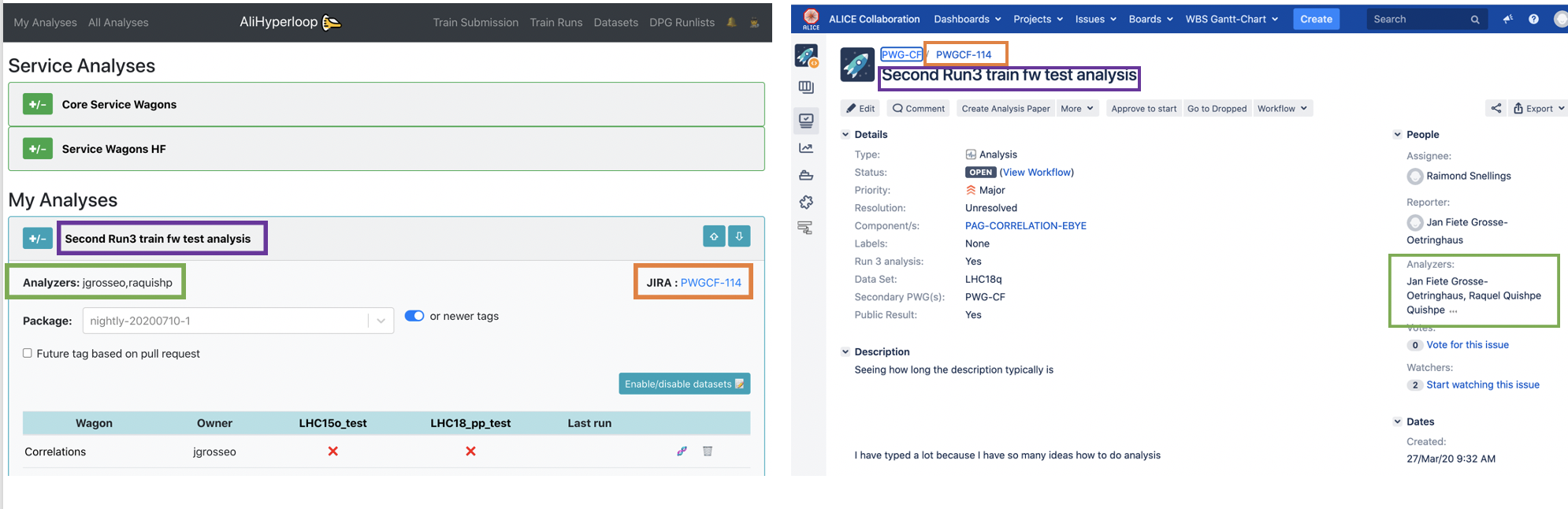
The synchronization from JIRA to the Hyperloop train system can take up to 30 minutes.